CLI
Every flowpact command, flag, output format and environment variable.
| Command | What it does |
|---|---|
flowpact lint | Analyze workflows and local actions and report findings. |
flowpact check | lint plus a comparison with the committed contracts. |
flowpact impact | Check that the release impact a pull request declares covers its changes to published workflows and actions. |
flowpact generate | Write (or preview) the contracts. |
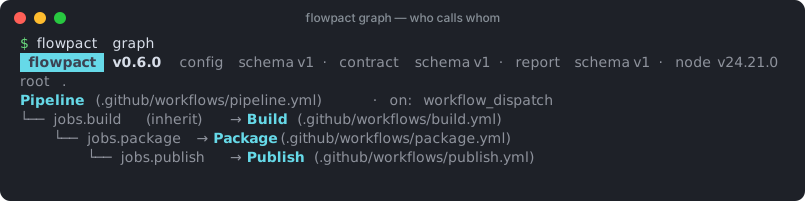
flowpact graph | Show the call graph of workflows and actions. |
flowpact trace | Follow a value down to where it is used, or up to where it comes from. |
flowpact explain | Print the docs for a rule. |
flowpact rules | List the rules and their effective severities. |
flowpact lsp | Start the language server for editors. |
The analysis commands (lint, check, impact, generate, trace) start by printing the tool version and the
version of every schema they read or write (to stderr, so JSON on stdout stays clean):
 flowpact  v0.5.0  config schema v1 · contract schema v1 · report schema v1 · node v24.4.0
root . · config .github/flowpact/flowpact.config.yml
flowpact --version prints the same line.
flowpact lint
Analyzes all workflows and local actions and reports findings.
flowpact lint [paths…] [options]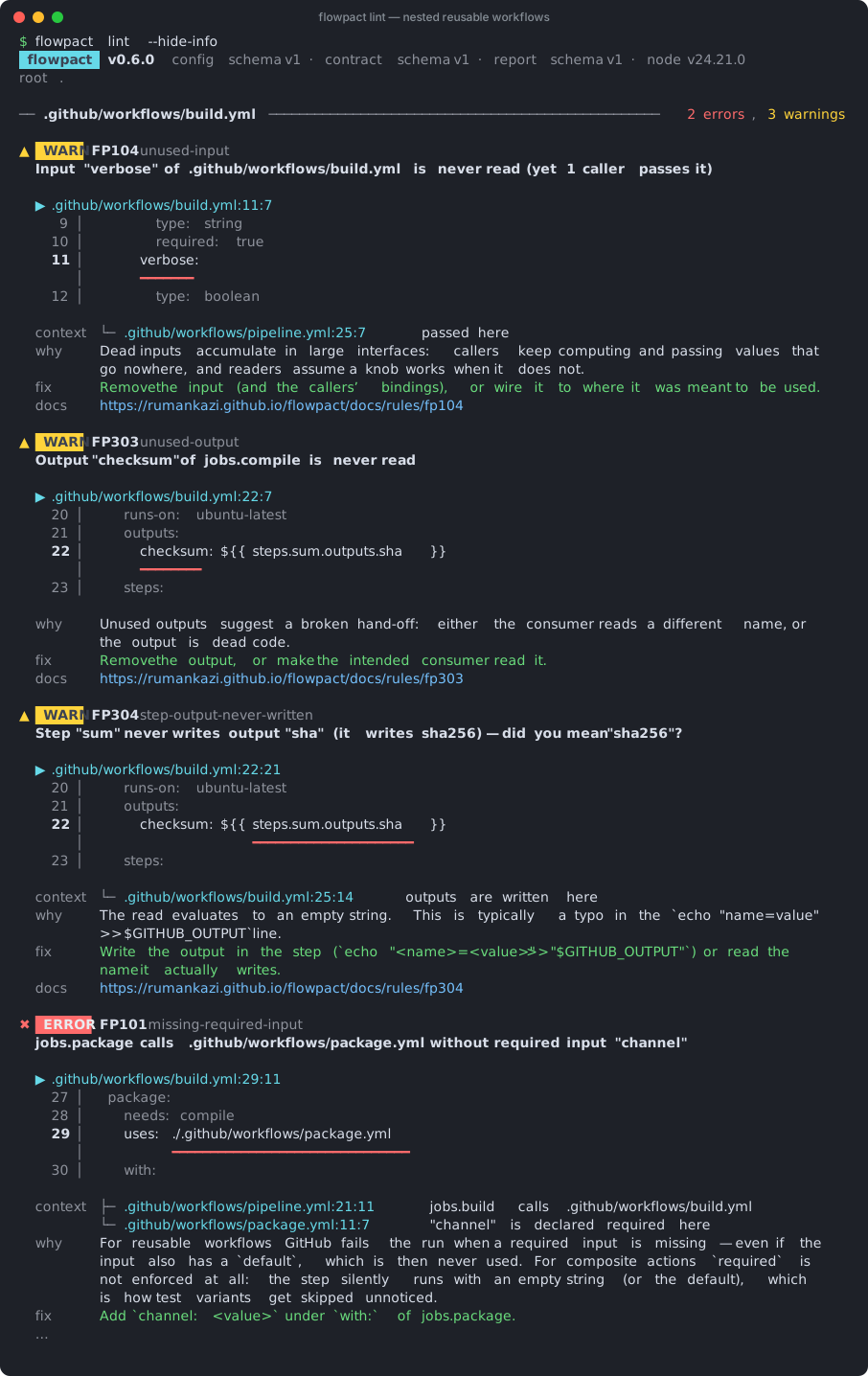
| Option | Description |
|---|---|
[paths…] | Files or directories to report on. Everything is still analyzed. |
--root <dir> | Repository root (default: current directory). |
--config <file> | Config file (default: .github/flowpact/flowpact.config.yml). |
--format pretty|json|markdown|sarif | Output on stdout (default pretty). See output formats. |
-o, --output <file> | Also write the report to a file, format by extension: .sarif / .sarif.json → SARIF, .json → JSON, .md → Markdown, anything else → plain text. |
--fail-on error|warning|never | Exit 1 when findings at this level exist (default error). |
--only <codes> | Comma-separated codes or names to run, e.g. FP401,unused-input. |
--hide-info | Pretty terminal output only: do not list info findings (they are still counted). JSON, Markdown and SARIF always include them. |
--include-graph | Add the data-flow graph to JSON output and the call graph (Mermaid) to Markdown output. |
--dump-graph <file> | Write the data-flow graph as JSON (debugging). |
--no-schema | Skip validation against GitHub's workflow schema. |
--impact | Also check the release impact of the changes against the declared impact, with --base <ref>, --expect none|patch|minor|major, --title <text> and --labels <a,b>. See flowpact impact. |
-d, --debug | Debug logging (see below). |
-v / -vv | Verbose / trace logging. |
-q, --quiet | No banner or logs, only the report and errors. |
--no-color | Disable colors (also NO_COLOR=1). |
--ascii | ASCII-only symbols for limited terminals. |
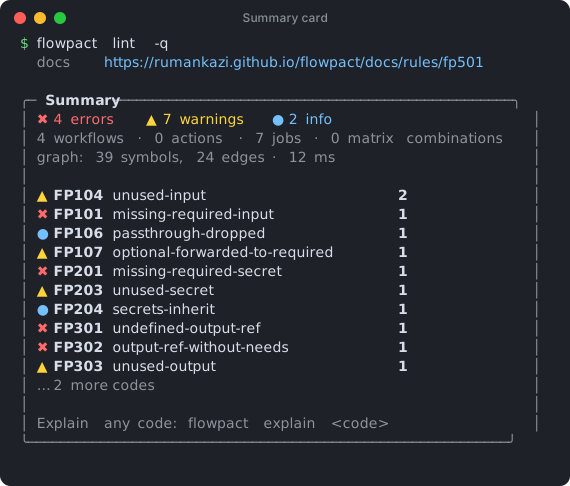
The summary card at the end:
Output formats
| Format | Use it for |
|---|---|
pretty | The terminal: code frames, call chains, matrix combinations and a summary card. |
json | Tooling. Follows /schemas/report/v1.json (below). |
markdown | Job summaries and pull request comments: counts, findings grouped by severity with docs links, and contract changes in flowpact check. Inside GitHub Actions, locations link to the file at the commit being checked. |
sarif | SARIF 2.1.0 for GitHub code scanning and other SARIF viewers. Findings accepted by overrides are left out (code scanning ignores SARIF suppressions); the JSON report lists them under suppressed. |
flowpact lint -o flowpact-report.json           # JSON file + pretty output in the terminal
flowpact lint -o flowpact.sarif                 # SARIF file for code scanning
flowpact lint -o flowpact-report.md             # Markdown file, e.g. for $GITHUB_STEP_SUMMARY
flowpact lint -o flowpact-report.txt            # plain-text copy of the pretty report
flowpact lint --format json > report.json  # JSON only
JSON report
The JSON report follows /schemas/report/v1.json:
{
  "$schema": "https://rumankazi.github.io/flowpact/schemas/report/v1.json",
  "meta": { "tool": "flowpact", "version": "0.5.0", "schemas": { "config": 1, "contract": 1, "report": 1 }, "node": "v24.4.0", "platform": "linux-x64", "root": "/home/runner/work/app/app", "durationMs": 31 },
  "summary": { "errors": 1, "warnings": 0, "infos": 0, "suppressed": 0, "byCode": { "FP401": 1 } },
  "findings": [
    {
      "code": "FP401",
      "name": "empty-binding-for-matrix-combo",
      "severity": "error",
      "message": "Input \"config\" for .github/workflows/run-suite.yml is empty in 1 of 3 matrix combinations — matrix.config is not defined there",
      "loc": { "file": ".github/workflows/tests.yml", "line": 23, "column": 19, "endLine": 23, "endColumn": 32 },
      "related": [{ "loc": { "file": ".github/workflows/tests.yml", "line": 18, "column": 13 }, "message": "this include entry has no `config`" }],
      "combos": ["{ name: windows }"],
      "symbol": ".github/workflows/run-suite.yml#inputs.config",
      "why": "…", "fix": "…",
      "docsUrl": "https://rumankazi.github.io/flowpact/docs/rules/fp401",
      "fingerprint": "3f2a9c0d81b7e645"
    }
  ],
  "suppressed": [],
  "rules": [{ "code": "FP101", "name": "missing-required-input", "severity": "error" }, "…"]
}symbolidentifies what the finding is about; use it as thetargetof an override.suppressedlists findings accepted by overrides, each with anoverrideobject (index,reason,expires,owner); they are not part of the counts.- In
flowpact check,contractsholds the contract comparison:drift, the number ofbreakingchanges,countsper status and one entry per contract file with its status and semantic changes. fingerprintis stable across unrelated edits (line shifts, changed counts), so it can be used to track findings over time.ruleslists every rule with its code, name and effective severity (offincluded).- With
--impact(orflowpact impact),impactholds the verdict: thebaseline, therequiredanddeclaredimpact,ok, and every graded change. See Impact mode.
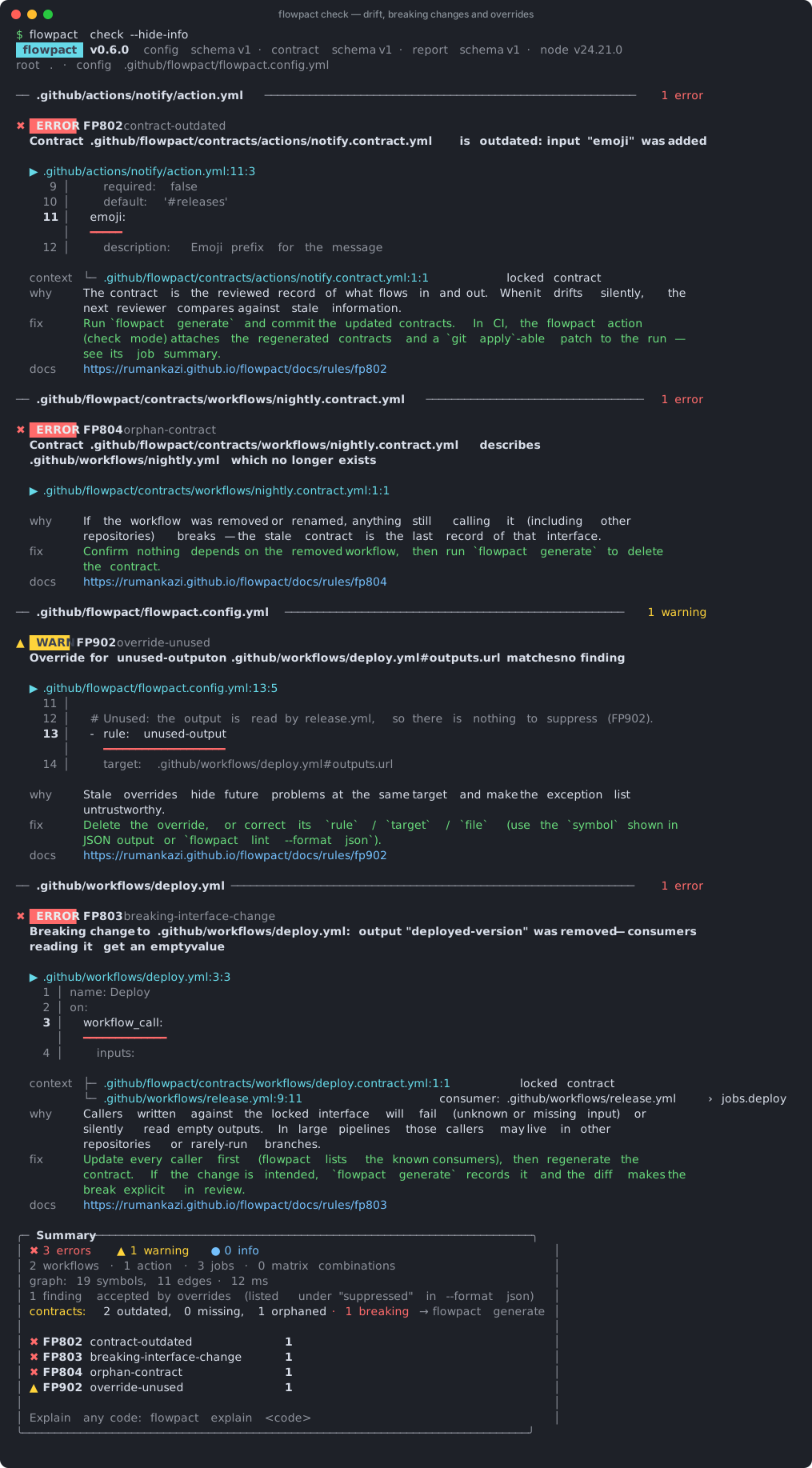
flowpact check
Everything flowpact lint does, plus a comparison with the contracts committed in
.github/flowpact/.
flowpact check [paths…] [options] [--patch <file>]It takes the same options as flowpact lint. Contract findings — missing (FP801), outdated (FP802), breaking
(FP803), orphaned (FP804) and invalid (FP805) contracts — are errors by default, so the command exits 1
until the contracts are regenerated.
With paths, the comparison covers the contracts of those workflows and actions, and the contracts that list them as
a consumer: a caller that stops passing an input or reading an output changes its callee's contract, so that drift
is reported too.
| Option | Description |
|---|---|
--patch <file> | When contracts drifted, also write a git apply-able patch with the regenerated contracts. |
flowpact generate
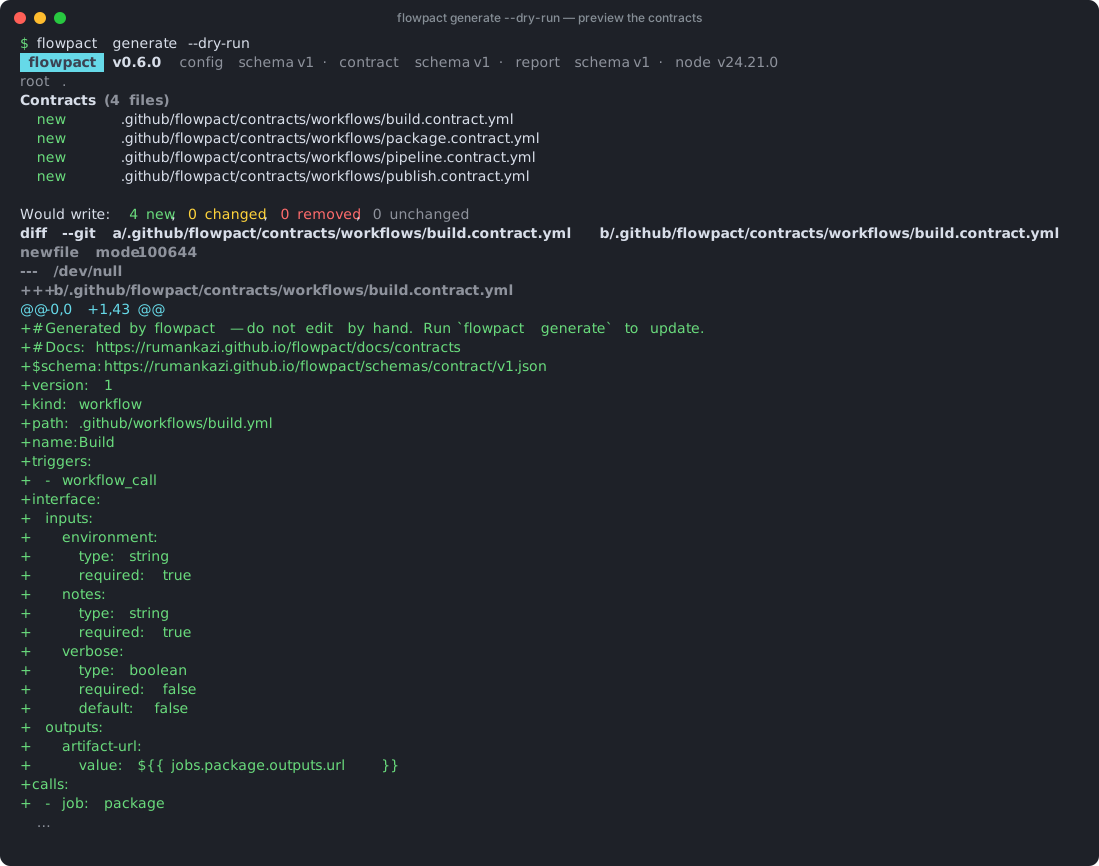
Writes the contract for every workflow and local action, and deletes contracts whose workflow or action no longer exists.
flowpact generate [--dry-run] [--patch <file>] [--out <dir>]| Option | Description |
|---|---|
--dry-run | Print the table of changes and a colored unified diff; write nothing. |
--patch <file> | Write the changes as a git apply-able patch instead of applying them. |
--out <dir> | Write all contracts (changed or not) under <dir>, keeping their relative paths, instead of the repository. Nothing is deleted. |
It also accepts --root, --config and the logging and color options. The table lists every contract file as new,
changed, removed or unchanged, with the semantic changes underneath; breaking changes are marked. Running it twice
in a row changes nothing.
flowpact graph
Shows which workflows call which reusable workflows and local actions.
flowpact graph [--format tree|mermaid|dot|json]| Format | Output |
|---|---|
tree (default) | A tree per top-level workflow in the terminal. |
mermaid | A Mermaid flowchart, rendered by GitHub in Markdown files, issues and pull requests. |
dot | Graphviz DOT, e.g. flowpact graph --format dot | dot -Tsvg > graph.svg. |
json | Nodes and edges for tooling. |
Edges are labelled with the calling job (jobs.build, or the step for local actions), ×N when the call fans out over
N matrix combinations, and (inherit) for secrets: inherit. Reusable workflows in other repositories appear as
remote nodes, local targets that do not exist as missing nodes, and job-level calls to files outside
.github/workflows (FP606) as invalid location nodes.
flowpact trace
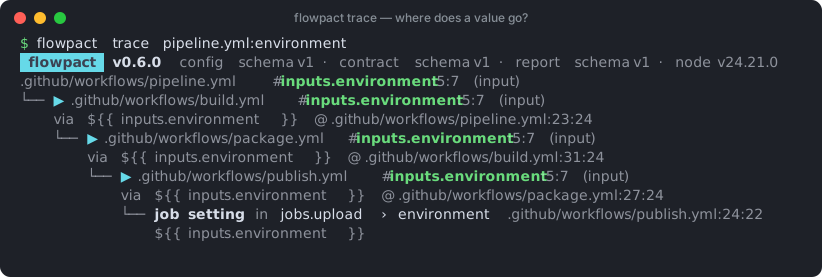
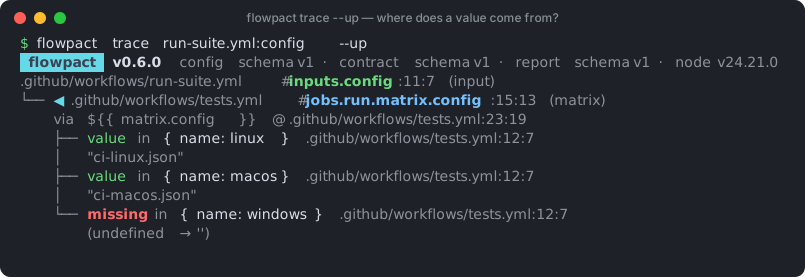
Shows where a value flows to, or with --up where it comes from.
flowpact trace <symbol> [--up] [--depth n] [--format pretty|json]Each symbol is expanded once per trace; where the same value is reached again through another path (for example
shared callees), the tree says ↑ shown above instead of repeating it. --format json always prints
{ "query", "direction", "traces": [...] }, however many symbols matched.
Symbols can be written in several ways:
| Query | Matches |
|---|---|
.github/workflows/ci.yml#inputs.env | exactly that symbol |
ci.yml#inputs.env | by file name |
ci.yml:env | inputs, secrets or outputs named env |
ci.yml | the whole interface of the workflow (every input, secret and output) |
flowpact impact
For publishers of reusable workflows and actions: checks that the release impact a pull request declares covers the changes to published units since its base. See Impact mode.
flowpact impact --base origin/main --title "fix: tidy the test job"It runs only the impact rules (FP810–FP814), so its exit code reflects only the verdict. flowpact lint --impact
and flowpact check --impact add the verdict to everything else they report. Options: --base, --expect,
--title, --labels and the output options of lint.
flowpact explain
flowpact explain FP401
flowpact explain empty-binding-for-matrix-combo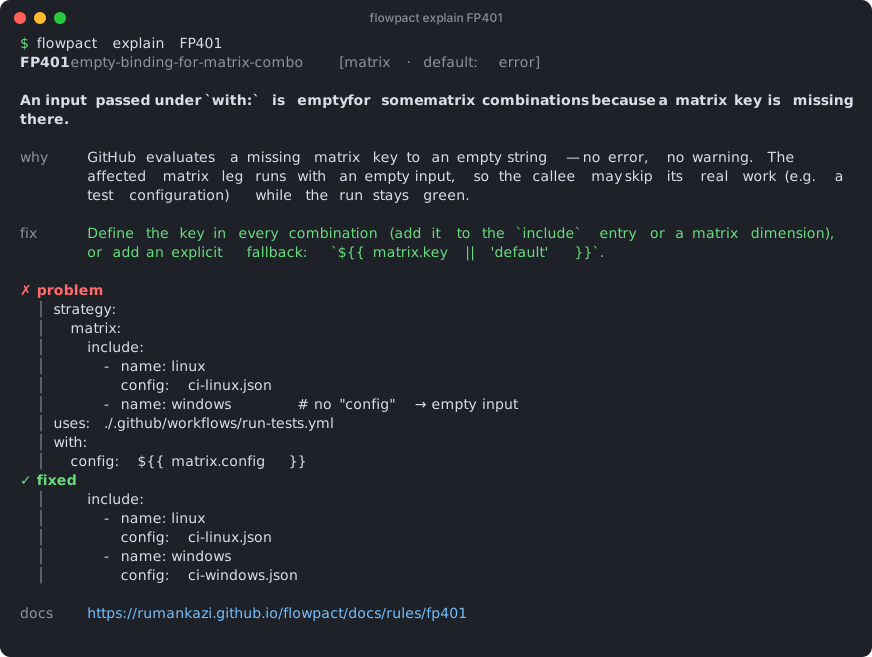
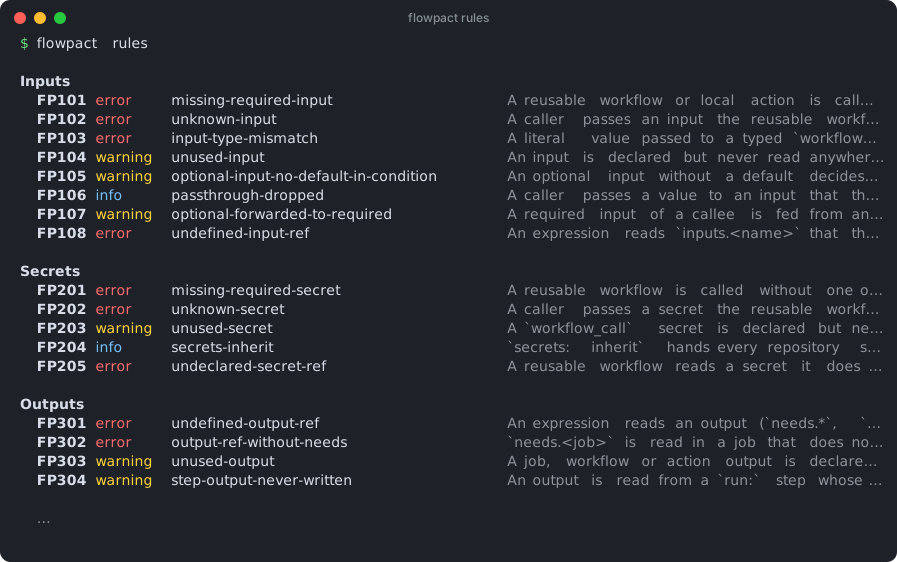
flowpact rules
Lists every built-in rule with its effective severity (after your config). --format json for tooling.
flowpact lsp
Starts the language server, which speaks the Language Server Protocol over stdin/stdout (--node-ipc and
--socket <port> are also accepted). Editors start it themselves; you do not run it by hand. It serves diagnostics as
you type, hover traces, go to definition across workflow calls, and references. See Editors for its
settings and how to set it up in Neovim and other editors; the VS Code extension bundles it.
Debug mode and logging
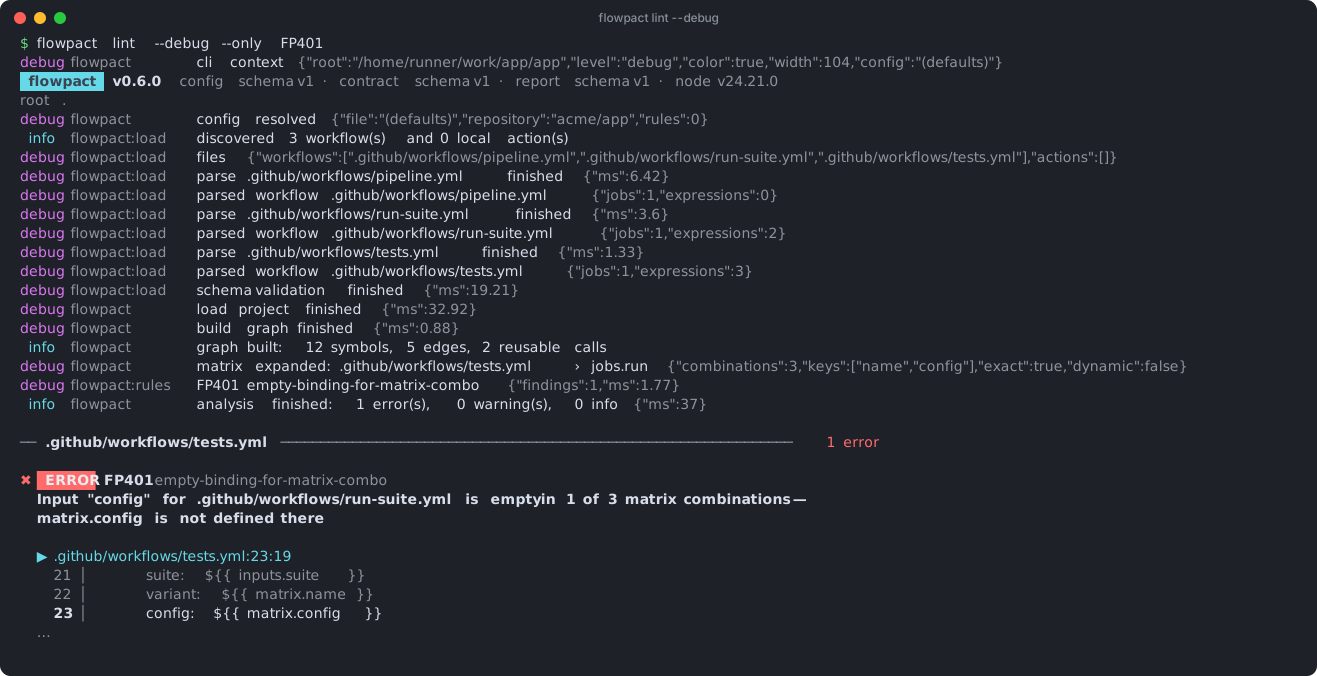
flowpact logs every stage of the analysis: config resolution, file discovery, parsing per file, graph construction, matrix expansion per job (combinations, keys, exactness), each rule with its finding count and timing, and the final summary.
| Enable with | Level |
|---|---|
--debug, -d, -v, FLOWPACT_DEBUG=1 | debug |
-vv, FLOWPACT_DEBUG=trace | trace (adds per-file timings and skipped rules) |
RUNNER_DEBUG=1, ACTIONS_STEP_DEBUG=true | debug — set automatically when you re-run a GitHub job with debug logging |
Logs go to stderr, so --format json output stays parseable.
Exit codes
| Code | Meaning |
|---|---|
0 | No findings at or above --fail-on (default: error). |
1 | Findings at or above --fail-on — including contract findings in flowpact check. |
2 | Usage or configuration error (unknown rule, invalid config, plugin that fails to load, nothing to analyze). |
3 | Internal error — please report it with --debug output. |
flowpact graph, flowpact trace, flowpact explain and flowpact rules exit 0 on success. flowpact generate
exits 0 too, or 1 when a file with YAML syntax errors could not be regenerated (its committed contract is kept).
Environment variables
| Variable | Effect |
|---|---|
NO_COLOR / FORCE_COLOR | Disable / force colors. |
FLOWPACT_DEBUG | 1 for debug logs, trace for trace logs. |
FLOWPACT_NO_HYPERLINKS | Disable clickable docs links (OSC 8). |
GITHUB_REPOSITORY | owner/repo, used to resolve same-repository uses: references (also read from .git/config or the repository config key). |
COLUMNS | Output width when not attached to a terminal. |